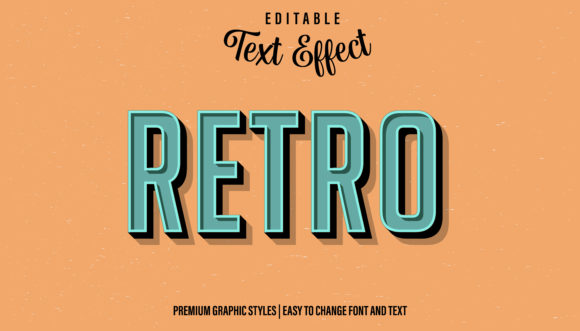
Retro Graphic Style for Illustrator: Instant Vintage Impact
There’s a certain magic to vintage design. It evokes nostalgia, authenticity, and a handcrafted feel that modern, sterile graphics often lack. For designers and creators, achieving that perfect retro look traditionally required hours of meticulous work—layering effects, adjusting textures, and fine-tuning colors. The Retro Graphic Style for Illustrator changes that dynamic entirely. This isn't just a font or a static image; it's a powerful, editable text effect designed as an Adobe Illustrator graphic style. It allows you to apply a complete, professionally crafted vintage aesthetic to any vector object in seconds.
Imagine having a toolkit that instantly transforms standard text, logos, or shapes into eye-catching, retro-inspired artwork. That's the core value here. You drag and drop the style into your Appearance panel, select your element, and apply it. The effect is immediate, giving you a textured, worn, and colorful look that feels pulled from a classic arcade cabinet or a 1970s movie poster. It’s a premium font effect that works like a design accelerator.
What Exactly Is This Graphic Style?
At its heart, the Retro Graphic Style for Illustrator is a pre-configured set of appearance attributes. Think of it as a recipe for a specific visual outcome. When you apply it, Illustrator automatically adds multiple layers of fills, strokes, and effects to your selected object. These layers work together to create the final look: perhaps a solid base color, a slightly offset shadow for depth, a textured overlay for that gritty feel, and subtle color shifts that mimic aged printing. The result is a cohesive, complex effect that would take significant time to build from scratch.
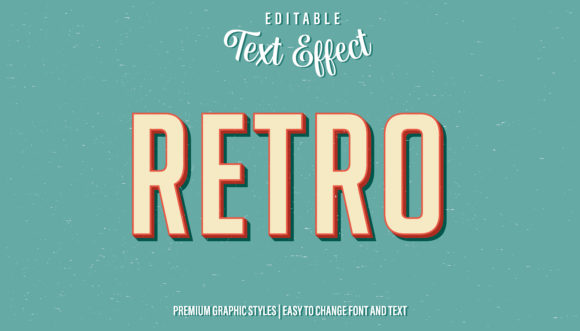
The visual personality is unmistakable. It leans into the bold, saturated color palettes and heavy typography of mid-20th-century design. You’ll find characteristics like subtle grain, halftone textures, and slight imperfections that give it an authentic, non-digital feel. The overall appeal is one of confident, playful nostalgia. It doesn’t look cheap or generic; it looks intentional and stylistically strong. This is the kind of creative font effect that elevates a project from ordinary to memorable.
Where This Style Truly Shines: Practical Applications
The versatility of the Retro Graphic Style for Illustrator is one of its greatest strengths. It’s not confined to a single use case. Its impact can be felt across a wide spectrum of projects, making it a valuable asset in any designer's library.
For logo design and brand identity, it’s a game-changer. Applying it to a company name or icon can instantly establish a brand’s personality as vintage, artisanal, fun, or rebellious. It’s perfect for craft breweries, barbershops, retro-themed cafes, or any business wanting to communicate heritage and character. The effect is consistent, ensuring your brand looks polished across all touchpoints.
In editorial design and packaging design, the style adds instant visual hierarchy and intrigue. A magazine headline or a product label using this effect will grab attention on a crowded shelf or page. It works exceptionally well for special editions, throwback themes, or products with a natural, handmade story. The texture and depth it provides make flat graphics feel more tactile and engaging.
Digital applications are equally compelling. Think social media graphics, YouTube thumbnails, and blog post headers. In a fast-scrolling feed, the bold, textured look of a retro graphic style stops the thumb. It communicates the content’s tone immediately—whether it’s a gaming stream, a vintage recipe, or a nostalgic story. For web design, it can be used selectively for key elements like call-to-action buttons or section headers to create focal points without overwhelming the entire layout.
Making It Work for You: Guidance and Considerations
While the Retro Graphic Style for Illustrator is designed for ease of use, a thoughtful approach will yield the best results. Here’s some practical guidance for integrating it into your workflow.
Evaluate the Project Fit. First, ask if the retro aesthetic aligns with your project’s goals. It’s ideal for projects that aim to evoke nostalgia, fun, craftsmanship, or a specific era. It might not be the best fit for a corporate financial report or a ultra-modern tech startup seeking a minimalist vibe. The style has a strong personality; ensure it matches the message you want to send.
Test Font Pairings Thoughtfully. The graphic style is applied to text, but the underlying typeface choice still matters. A bold, chunky sans serif font will amplify the impact, making it great for headlines. A classic serif font can add a more sophisticated, editorial retro feel. If you want to use it on a script font or handwritten font, test it first—complex letterforms might not always render the texture effects cleanly. The key is to choose a typeface with enough weight and simplicity to let the retro effect be the star.
Leverage the Editable Nature. Remember, this is an editable text effect. Once applied, you can easily change the wording. Select the text, type your new word, and the entire retro effect updates automatically. You can also experiment with changing the font while the style is applied to see different instant results. This flexibility is perfect for creating multiple variations for a campaign or client approvals.
Consider Readability. While the effect is stunning, always prioritize readability, especially for longer text or critical information. The textures and colors can reduce contrast. Use it primarily for display purposes: headlines, logos, short phrases, and decorative elements. For body copy, stick to clean, readable sans serif fonts or serif fonts without the effect.
Review the Commercial License. If you’re a professional designer, entrepreneur, or content creator, you’ll likely use this asset in commercial projects. Always check the license that comes with the Retro Graphic Style for Illustrator. A good license will permit use in end products for sale (like merchandise, templates, or client work) and across unlimited projects. This ensures you’re covered legally and can confidently use this design asset to build your business or serve your clients.
Ultimately, the Retro Graphic Style for Illustrator is more than just a cool effect—it’s a practical tool for efficient, high-impact design. It bridges the gap between a desired aesthetic and the time required to achieve it, letting you focus on the bigger creative picture. Whether you’re crafting a brand identity, designing social media graphics, or developing packaging design, it provides a reliable shortcut to professional, eye-catching results. It’s a testament to how smart modern typography tools can empower creators at every level.